 6:57 PM
 killnine
Recently, I tried the free online paper trading platform from tradeMonster. Just want to share my experiences with the readers here.
What I like about the trading platform:
* Very easy customization of interface, really user-friendly.
If we want to customize / change the layout of the screen, it can be done just by one click.
This easy customization is offered in each screen.
For example:
In the Option Chain screen, with just one click, we can expand/collapse the Calls/Puts sides of the Option Chain.
When we expand the Calls side (and collapse the Puts side), for instance, we can see all information about Bid/Ask Price, Volume, Open Interest, Implied Volatility (IV), etc. for various strike prices, all can be viewed in one page. We can even choose to view all those info for different expiration months.
In addition, in case we want to customize (add/remove) the column/s (e.g. add High and Low Price, Greeks info, such as Delta, Gamma, Vega, Theta, Rho), we can simply check or uncheck boxes provided. Marvelous!
* Real-time, streaming data throughout the trading platform, such as Quotes, Charts, Option Chains, Time & Sales, etc.
It allows quick monitoring of the fast changing market and also helps to make trading a lot more convenient, e.g. for setting the limit price.
* Browser-based trading platform.
We don�t need to download any software to start the application and, therefore, can trade from anywhere. I like this, because it is particularly convenient when we need to work on a few different computers (e.g. office and home computers), or when we want to change from old to new computer. We don�t need to reset our preferred interface settings all over again when we need to use another computer.
* Easy click trading.
Whenever we want to trade, we can simply click on the symbol (whether stock or option), and then a new window will pop up to allow for a quick trade. We can do this at any page/window we�re in, such as Watch List, Option Chain, Market View, Quotes.
With this quick trade window, we don�t need to type in the symbol when we want to trade, so it�s much easier and faster, especially for trading options (e.g. spreads, strangle, straddle, condor, butterfly, etc.)
I believe that option traders who like to trade more complicated strategies as mentioned above would love this!
* There are brief descriptions/explanations about the technical indicators just below it.
It helps to give some ideas (e.g. what it is for, how it is derived) before applying the study to complement chart analysis.
* Provide comprehensive research and fundamental analysis about a company.
* Provide comprehensive & clear Help menu.
It even has pretty cool introduction videos that show all the capabilities of the interface.
So, it�s very easy to learn and familiarize ourselves with how to do certain things using this interface.
* Provide free Investor Education, including live webinars, articles, and interactive courses.
Areas of Improvement:
* The Technical Analysis studies for chart analysis are currently still rather limited.
For example, there is no Fibonacci tool for chart analysis. Of course, this limitation may be subjective. This may not matter to other people, because they might not need to use this analysis tool as I normally do.
* The use of chart is not as convenient as the other interfaces.
For example, when I�m interested to analyze the particular area of the chart, I cannot zoom in to that particular area to by simply dragging the cursor. Also, I cannot show and monitor several charts for different symbols simultaneously in one screen. However, these can easily be done using Prophet�s JavaChart.
* While there is an advantage of being a browser-based trading platform, there is also disadvantage.
When clicking some tabs / buttons, it takes some time (a few seconds) to load the application. The loading speed will depend on our internet connection. The faster the internet connection is, the faster the loading speed will be. However, once the application is already uploaded, we need not go through the loading process again, as the interface is already �cached�.
Wish Lists:
If I could wish, it would be even much better if the trading platform provide the following:
* Screener for Stock and Chart Patterns
* Options Calculator / Pricer
This is particularly useful for those who like to use technical analysis to help their trading and option traders. As if most their needs can be fulfilled in one integrated application.
Though they are not available yet now, I heard that many improvements for trade analysis tools are under development.
PRICING:
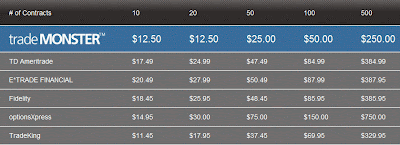
The commission charges for Options are $0.50 per contract, with a minimum commission of $12.50 for single leg orders, and $7.50 per leg for multi-leg orders.
For Stocks, the commission charge is $7.50 per trade (regardless how many shares bought), unless trading in after-hours where there is a 1.5 cent per share added charge.
Here are the tables for some comparison:
For Options � Single Leg Order:
For Options � 2-Leg Option Spread:

For Stocks:

As comparison, for options trades, my broker (Interactive Broker) charges commission $0.70 / contract, with minimum per order is $1.00.
So, for those who usually trade 18 contracts or more per trade, TradeMonster will be cheaper.
For those who trade less than 18 contracts per trade, Interactive Broker would be cheaper.
However, the good thing about TradeMonster is that there is no minimum monthly fee. Hence, in case you�re on holiday and do not trade at all or do not actively trade for that month, you don�t need to pay any fee. Whereas for Interactive Broker, there is a minimum monthly fee of $10, even if you don�t trade at all for the month.
In addition, for Interactive Broker, if you make any cancelation or modification to the order (that has not been executed yet), it will charge you some fees as well. However, no such fees will be charged by TradeMonster.
Closing Note:
Actually, it�s rather difficult to describe how easy and simple the customization of interface is. Like when I was trying to explain about how easy and simple to customize Option Chain, actually words are still not good enough to describe. Of course, it�ll be much better if one can experience it himself. Hence, if you�re interested, you may want to try the free paper trading provided from this broker. One good thing about its paper trading platform is that it allows you to execute trade during non-trading hours. So, you can try it anytime, during the weekend or your own free time.
Opening a paper trading account is very easy. You don�t need to open the real account or fund the account first. You just simply apply by filling up some particulars, then the free paper trading account will be open instantly, no need to wait for approval process, etc.
Happy trying! =)
What I like about the trading platform:
* Very easy customization of interface, really user-friendly.
If we want to customize / change the layout of the screen, it can be done just by one click.
This easy customization is offered in each screen.
For example:
In the Option Chain screen, with just one click, we can expand/collapse the Calls/Puts sides of the Option Chain.
When we expand the Calls side (and collapse the Puts side), for instance, we can see all information about Bid/Ask Price, Volume, Open Interest, Implied Volatility (IV), etc. for various strike prices, all can be viewed in one page. We can even choose to view all those info for different expiration months.
In addition, in case we want to customize (add/remove) the column/s (e.g. add High and Low Price, Greeks info, such as Delta, Gamma, Vega, Theta, Rho), we can simply check or uncheck boxes provided. Marvelous!
* Real-time, streaming data throughout the trading platform, such as Quotes, Charts, Option Chains, Time & Sales, etc.
It allows quick monitoring of the fast changing market and also helps to make trading a lot more convenient, e.g. for setting the limit price.
* Browser-based trading platform.
We don�t need to download any software to start the application and, therefore, can trade from anywhere. I like this, because it is particularly convenient when we need to work on a few different computers (e.g. office and home computers), or when we want to change from old to new computer. We don�t need to reset our preferred interface settings all over again when we need to use another computer.
* Easy click trading.
Whenever we want to trade, we can simply click on the symbol (whether stock or option), and then a new window will pop up to allow for a quick trade. We can do this at any page/window we�re in, such as Watch List, Option Chain, Market View, Quotes.
With this quick trade window, we don�t need to type in the symbol when we want to trade, so it�s much easier and faster, especially for trading options (e.g. spreads, strangle, straddle, condor, butterfly, etc.)
I believe that option traders who like to trade more complicated strategies as mentioned above would love this!
* There are brief descriptions/explanations about the technical indicators just below it.
It helps to give some ideas (e.g. what it is for, how it is derived) before applying the study to complement chart analysis.
* Provide comprehensive research and fundamental analysis about a company.
* Provide comprehensive & clear Help menu.
It even has pretty cool introduction videos that show all the capabilities of the interface.
So, it�s very easy to learn and familiarize ourselves with how to do certain things using this interface.
* Provide free Investor Education, including live webinars, articles, and interactive courses.
Areas of Improvement:
* The Technical Analysis studies for chart analysis are currently still rather limited.
For example, there is no Fibonacci tool for chart analysis. Of course, this limitation may be subjective. This may not matter to other people, because they might not need to use this analysis tool as I normally do.
* The use of chart is not as convenient as the other interfaces.
For example, when I�m interested to analyze the particular area of the chart, I cannot zoom in to that particular area to by simply dragging the cursor. Also, I cannot show and monitor several charts for different symbols simultaneously in one screen. However, these can easily be done using Prophet�s JavaChart.
* While there is an advantage of being a browser-based trading platform, there is also disadvantage.
When clicking some tabs / buttons, it takes some time (a few seconds) to load the application. The loading speed will depend on our internet connection. The faster the internet connection is, the faster the loading speed will be. However, once the application is already uploaded, we need not go through the loading process again, as the interface is already �cached�.
Wish Lists:
If I could wish, it would be even much better if the trading platform provide the following:
* Screener for Stock and Chart Patterns
* Options Calculator / Pricer
This is particularly useful for those who like to use technical analysis to help their trading and option traders. As if most their needs can be fulfilled in one integrated application.
Though they are not available yet now, I heard that many improvements for trade analysis tools are under development.
PRICING:
The commission charges for Options are $0.50 per contract, with a minimum commission of $12.50 for single leg orders, and $7.50 per leg for multi-leg orders.
For Stocks, the commission charge is $7.50 per trade (regardless how many shares bought), unless trading in after-hours where there is a 1.5 cent per share added charge.
Here are the tables for some comparison:
For Options � Single Leg Order:

For Options � 2-Leg Option Spread:

For Stocks:

As comparison, for options trades, my broker (Interactive Broker) charges commission $0.70 / contract, with minimum per order is $1.00.
So, for those who usually trade 18 contracts or more per trade, TradeMonster will be cheaper.
For those who trade less than 18 contracts per trade, Interactive Broker would be cheaper.
However, the good thing about TradeMonster is that there is no minimum monthly fee. Hence, in case you�re on holiday and do not trade at all or do not actively trade for that month, you don�t need to pay any fee. Whereas for Interactive Broker, there is a minimum monthly fee of $10, even if you don�t trade at all for the month.
In addition, for Interactive Broker, if you make any cancelation or modification to the order (that has not been executed yet), it will charge you some fees as well. However, no such fees will be charged by TradeMonster.
Closing Note:
Actually, it�s rather difficult to describe how easy and simple the customization of interface is. Like when I was trying to explain about how easy and simple to customize Option Chain, actually words are still not good enough to describe. Of course, it�ll be much better if one can experience it himself. Hence, if you�re interested, you may want to try the free paper trading provided from this broker. One good thing about its paper trading platform is that it allows you to execute trade during non-trading hours. So, you can try it anytime, during the weekend or your own free time.
Opening a paper trading account is very easy. You don�t need to open the real account or fund the account first. You just simply apply by filling up some particulars, then the free paper trading account will be open instantly, no need to wait for approval process, etc.
Happy trying! =)


