Showing posts with label How To Get Started Trading. Show all posts

10 Important Trading Lessons

I got to know that there is a series of free trading lessons, which consists of 10 topics that traders, both beginners and experienced traders should find them very useful.
While for more experienced traders, they could serve as a refresher, I think these trading lessons are particularly even more important for beginners.

The 10 Free Trading Lessons will cover the following topics:

(1) The importance of psychology in price movement.

(2) How to spot mega trends.

(3) Understanding of technical price objectives.

(4) How to picture price objectives.

(5) How to trade with moving averages.

(6) How to use point and figure trading techniques.

(7) How to use the RSI indicator.

(8) How to correctly use stochastics in your trading.

(9) How to use the ADX indicator to capture trends.

(10) How to capitalize on natural market cycles.

On top of the above, you will learn all about Fibonacci retracements, MACD, Bollinger Bands, and much more.

These 10 free trading lessons will be sent via email.
In order to get this, just fill out the form here. Then you should be able to get it started very soon.
Hope this info can be useful to you. :)

Trailing Stop Limit Order

Trailing Stop Limit Order is similar to Trailing Stop Order, whereby the Trailing Stop Price will be �trailing� below or above the movement of the security�s market price, depending on whether it is on a long or short position, to maintain the set distance, which is either stipulated as an absolute dollar or as a percentage of the market price.

The main difference is that for Trailing Stop Limit Order, when the Stop Price is passed, the order will be converted into a Limit Order, whereas for Trailing Stop Order, it�ll convert into a Market Order.

Hence, for Trailing Stop Limit Order, when the market price hits or passes the Stop Price, the order would convert into a Limit Order to buy / sell the security at the specified Limit Price or better.

As a result, Trailing Stop Limit Order carries a big risk, as the order may never get filled if the market price is worse than the Limit Price. As a result, the position can continue falling with no more protection for the position. This makes Trailing Stop Limit Order a very insecure stop loss method, particularly for the extremely volatile stocks that often experience a gap up or gap down in prices.
Due to this risk, using Trailing Stop Limit Order to protect a position is not advisable.

Depending on the position on the market you have (long or short), there are 2 types of Trailing Stop Limit Order:
a) Sell Trailing Stop Limit Order (Trailing Stop Limit to Sell)
This is the trailing stop order when you have a long position on a security.
In this case, the Trailing Stop Price is placed at a set distance (e.g. Trailing Amount) below current market price of the security.
In addition, the Trailing Limit Price will also need to be specified as a certain distance (e.g. Limit Offset) from the Stop Price, whereby the Limit Price should be at a least the same or lower than the Stop Price.

The Stop Price will then rise as the market price increases (i.e. The Stop Price will be trailing the increasing market price from below: Stop Price = Increasing Market Price � Trailing Amount).
However, the Stop Price will remain the same (will not go lower) when the market price decreases.
Once the market price hits or passes Stop Price, the order would convert into a Limit Order to sell the security at the Limit Price (Limit Price = Stop Price � Limit Offset) or better (i.e. at Limit Price or higher, because for selling, the higher the price, the better).

b) Buy Trailing Stop Limit Order (Trailing Stop Limit to Buy)
This is the trailing stop order when you have a short position on a security.
In this case, the Trailing Stop Price is placed at a set distance (e.g. Trailing Amount) above current market price of the security.
In addition, the Trailing Limit Price will also need to be specified as a certain distance (e.g. Limit Offset) from the Stop Price, whereby the Limit Price should be at a least the same or higher than the Stop Price.

The Stop Price will then move lower as the market price decreases (i.e. The Stop Price will be trailing the decreasing market price from above: Stop Price = Decreasing Market Price + Trailing Amount).
However, the Stop Price will remain the same (will not go higher) when the market price increases.
Once the market price hits or passes Stop Price, the order would convert into a Limit Order to buy the security at the Limit Price (Limit Price = Stop Price + Limit Offset) or better (i.e. at Limit Price or lower, because for buying, the lower the price, the better)

Note:
When placing Trailing Stop Limit Order for an Option, the order will be triggered based on the market price of the option, NOT the market price of the underlying stock. Therefore, the Stop Price should be set based on the option�s price as well.

Therefore, just remember how the price of Call and Put options are related to the underlying stock price:
For a Call option, the option�s price increases when the underlying stock�s price increases, and decreases when the underlying stock�s price decreases (positive relationship).
On the other hand, for a Put option, the option�s price increases when the underlying stock�s price decreases, and decreases as the underlying stock�s price increases (negative relationship).

Example:
Suppose the stock price ABC is on a downtrend. You expect that the stock price ABC will continue to drop further. To take advantage of this opportunity, you short-sell the stock at $20, and place a Buy Trailing Stop Limit order with Trailing Amount = $0.3 and Limit Offset = $0.2.
In this case, the initial Buy Stop Price will be $20.3 and the initial Limit Price is 20.5.
When the stock price falls to $19, the Buy Stop Price will adjust accordingly to $19.3 and Limit Price to $19.5.
If the stock price continues to drop further to $18, the Buy Stop Price will adjust to $18.3 and Limit Price to $18.5.
Suddenly, the stock price stops to drop and begins to increase. In this case, the Buy Stop Price will remain at $18.3. Once the Stop Price of $18.3 is hit, the order will convert into a Limit Order to buy back the stocks at the price $18.5 or lower.
As with the risk of Stop Limit Order, this order may never get filled if the market price is worse than the Limit Price. Hence, the position can continue falling with no more protection for the position.
In this example, suppose the stock price gaps up to $17 and continue to increase, the order will never get filled. This makes Trailing Stop Limit Order a risky method for protecting a position / taking profit, and hence not advisable.

For the list of other types of order, go to: Types of Orders in Trading.

Related Topics:
* Free Trading Educational Video: Learn Technical Tips from Dan Gramza
* Option Greek
* Understanding Implied Volatility (IV)
* Understanding Option�s Time Value
* Learning Candlestick Charts
* Learning Charts Patterns

Trailing Stop Order

Trailing Stop Order is a Stop Order that continually adjusts the Stop Price as the market price of the security moves (i.e. trailing the security�s market price).
The Trailing Stop Price is placed at a set distance (either as an absolute dollar or as a percentage of the market price) below or above the market price, depending on whether it�s on a long or short position.
The Trailing Stop Price will then adjust as the market price of the security moves, maintaining the set distance.

If the market price hits or passes through the Stop Price, the order would convert into a Market Order, and will be filled at the best available price in the market at that time.
The same advantage & disadvantage of Market Order apply to Trailing Stop Order as well.

The advantage of Trailing Stop Order is that it can allow traders/investors to let the profits run (as long as the price does not fall to the Stop Price), while at the same time, limit the losses without continually having to adjust and place new Stop Loss orders.

Depending on the position on the market you have (long or short), there are 2 types of Trailing Stop Order:
a) Sell Trailing Stop Order (Trailing Stop to Sell)
This is the trailing stop order when you have a long position on a security.
In this case, the Trailing Stop Price is placed at a set distance (either as an absolute dollar or as a percentage of the market price) below current market price of the security.

The Stop Price will then rise as the market price increases (i.e. The Stop Price will be trailing the increasing market price from below: Stop Price = Increasing Market Price � Trailing Amount).
However, the Stop Price will remain the same (will not go lower) when the market price decreases.
Once the market price hits or passes through Stop Price, the order would convert into a Market Order to sell the security at the best available price in the market at that time.

b) Buy Trailing Stop Order (Trailing Stop to Buy)
This is the trailing stop order when you have a short position on a security.
In this case, the Trailing Stop Price is placed at a set distance (either as an absolute dollar or as a percentage of the market price) above current market price of the security.

The Stop Price will then move lower as the market price decreases (i.e. The Stop Price will be trailing the decreasing market price from above: Stop Price = Decreasing Market Price + Trailing Amount).
However, the Stop Price will remain the same (will not go higher) when the market price increases.
Once the market price hits or passes through Stop Price, the order would convert into a Market Order to buy the security at the best available price in the market at that time.

Note:
When placing Trailing Stop Order for an Option, the order will be triggered based on the market price of the option, NOT the market price of the underlying stock. Therefore, the Stop Price should be set based on the option�s price as well.

Therefore, just remember how the price of Call and Put options are related to the underlying stock price:
For a Call option, the option�s price increases when the underlying stock�s price increases, and decreases when the underlying stock�s price decreases (positive relationship).
On the other hand, for a Put option, the option�s price increases when the underlying stock�s price decreases, and decreases as the underlying stock�s price increases (negative relationship).

Example � Trailing Stop as an Absolute Dollar:
Suppose the stock price ABC is on a downtrend. You expect that the stock price ABC will continue to drop further. You bought Put option contracts of that stock at $3/contract, and place a Sell Trailing Stop order, with an absolute Trailing Amount at $0.5. That means the initial Stop Price is set at $2.5.
When the stock price ABC is falling and, as a result, the price of the Put option has increased to $4, the Stop Price will adjust accordingly to $3.5.
If the stock price ABC continues to drop further, and the price of the Put option then rises to $5, the Stop Price will adjust to $4.5.
Suddenly, the stock price ABC stops to drop and begins to increase. Consequently, the Put option�s price will drop. In this case, the Stop Price will remain at $4.5.
Once the Stop Price of $4.5 is hit, the order will convert into a Market Order to sell the Put option contracts at the best available price in the market at that time.

Example � Trailing Stop as a Percentage:
Similar as above, except that you place a Sell Trailing Stop order as Trailing Percentage at 20%.
In this case, the initial Stop Price will be set at $2.4 (= 3 � 20% x 3 = 3 � 0.6).
When the stock price ABC is falling and, as a result, the price of the Put option has increased to $4, the Stop Price will adjust accordingly to $3.2 (=4 � 20% x 4 = 4 � 0.8).
If the stock price ABC continues to drop further, and the price of the Put option then rises to $5, the Stop Price will adjust to $4 (= 5 � 20% x 5 = 5 � 1).
Suddenly, the stock price ABC stops to drop and begins to increase. Consequently, the Put option�s price will drop. In this case, the Stop Price will remain at $4.
Once the Stop Price of $4 is hit, the order will convert into a Market Order to sell the Put option contracts at the best available price in the market at that time.

As you can see here, when setting Trailing Stop as a percentage, the Trailing Amount will get bigger as the Market Price of the security increases.
On the other hand, when setting Trailing Stop as an absolute dollar, the Trailing Amount will remain the same.

For the list of other types of order, go to: Types of Orders in Trading.

Related Topics:
* Free Trading Educational Video: Learn Technical Tips from Dan Gramza
* Option Greek
* Understanding Implied Volatility (IV)
* Understanding Option�s Time Value
* Learning Candlestick Charts
* Learning Charts Patterns

Paper Trading Experience with tradeMONSTER Online Brokerage (Review)

Recently, I tried the free online paper trading platform from tradeMonster. Just want to share my experiences with the readers here.

What I like about the trading platform:
* Very easy customization of interface, really user-friendly.
If we want to customize / change the layout of the screen, it can be done just by one click.
This easy customization is offered in each screen.
For example:
In the Option Chain screen, with just one click, we can expand/collapse the Calls/Puts sides of the Option Chain.
When we expand the Calls side (and collapse the Puts side), for instance, we can see all information about Bid/Ask Price, Volume, Open Interest, Implied Volatility (IV), etc. for various strike prices, all can be viewed in one page. We can even choose to view all those info for different expiration months.
In addition, in case we want to customize (add/remove) the column/s (e.g. add High and Low Price, Greeks info, such as Delta, Gamma, Vega, Theta, Rho), we can simply check or uncheck boxes provided. Marvelous!

* Real-time, streaming data throughout the trading platform, such as Quotes, Charts, Option Chains, Time & Sales, etc.
It allows quick monitoring of the fast changing market and also helps to make trading a lot more convenient, e.g. for setting the limit price.

* Browser-based trading platform.
We don�t need to download any software to start the application and, therefore, can trade from anywhere. I like this, because it is particularly convenient when we need to work on a few different computers (e.g. office and home computers), or when we want to change from old to new computer. We don�t need to reset our preferred interface settings all over again when we need to use another computer.

* Easy click trading.
Whenever we want to trade, we can simply click on the symbol (whether stock or option), and then a new window will pop up to allow for a quick trade. We can do this at any page/window we�re in, such as Watch List, Option Chain, Market View, Quotes.
With this quick trade window, we don�t need to type in the symbol when we want to trade, so it�s much easier and faster, especially for trading options (e.g. spreads, strangle, straddle, condor, butterfly, etc.)
I believe that option traders who like to trade more complicated strategies as mentioned above would love this!

* There are brief descriptions/explanations about the technical indicators just below it.
It helps to give some ideas (e.g. what it is for, how it is derived) before applying the study to complement chart analysis.

* Provide comprehensive research and fundamental analysis about a company.

* Provide comprehensive & clear Help menu.
It even has pretty cool introduction videos that show all the capabilities of the interface.
So, it�s very easy to learn and familiarize ourselves with how to do certain things using this interface.

* Provide free Investor Education, including live webinars, articles, and interactive courses.

Areas of Improvement:
* The Technical Analysis studies for chart analysis are currently still rather limited.
For example, there is no Fibonacci tool for chart analysis. Of course, this limitation may be subjective. This may not matter to other people, because they might not need to use this analysis tool as I normally do.

* The use of chart is not as convenient as the other interfaces.
For example, when I�m interested to analyze the particular area of the chart, I cannot zoom in to that particular area to by simply dragging the cursor. Also, I cannot show and monitor several charts for different symbols simultaneously in one screen. However, these can easily be done using Prophet�s JavaChart.

* While there is an advantage of being a browser-based trading platform, there is also disadvantage.
When clicking some tabs / buttons, it takes some time (a few seconds) to load the application. The loading speed will depend on our internet connection. The faster the internet connection is, the faster the loading speed will be. However, once the application is already uploaded, we need not go through the loading process again, as the interface is already �cached�.

Wish Lists:
If I could wish, it would be even much better if the trading platform provide the following:
* Screener for Stock and Chart Patterns
* Options Calculator / Pricer

This is particularly useful for those who like to use technical analysis to help their trading and option traders. As if most their needs can be fulfilled in one integrated application.
Though they are not available yet now, I heard that many improvements for trade analysis tools are under development.

PRICING:
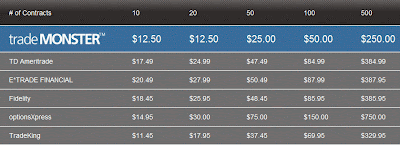
The commission charges for Options are $0.50 per contract, with a minimum commission of $12.50 for single leg orders, and $7.50 per leg for multi-leg orders.
For Stocks, the commission charge is $7.50 per trade (regardless how many shares bought), unless trading in after-hours where there is a 1.5 cent per share added charge.
Here are the tables for some comparison:

For Options � Single Leg Order:

For Options � 2-Leg Option Spread:


For Stocks:


As comparison, for options trades, my broker (Interactive Broker) charges commission $0.70 / contract, with minimum per order is $1.00.
So, for those who usually trade 18 contracts or more per trade, TradeMonster will be cheaper.
For those who trade less than 18 contracts per trade, Interactive Broker would be cheaper.

However, the good thing about TradeMonster is that there is no minimum monthly fee. Hence, in case you�re on holiday and do not trade at all or do not actively trade for that month, you don�t need to pay any fee. Whereas for Interactive Broker, there is a minimum monthly fee of $10, even if you don�t trade at all for the month.

In addition, for Interactive Broker, if you make any cancelation or modification to the order (that has not been executed yet), it will charge you some fees as well. However, no such fees will be charged by TradeMonster.

Closing Note:
Actually, it�s rather difficult to describe how easy and simple the customization of interface is. Like when I was trying to explain about how easy and simple to customize Option Chain, actually words are still not good enough to describe. Of course, it�ll be much better if one can experience it himself. Hence, if you�re interested, you may want to try the free paper trading provided from this broker. One good thing about its paper trading platform is that it allows you to execute trade during non-trading hours. So, you can try it anytime, during the weekend or your own free time.

Opening a paper trading account is very easy. You don�t need to open the real account or fund the account first. You just simply apply by filling up some particulars, then the free paper trading account will be open instantly, no need to wait for approval process, etc.
Happy trying! =)

Stop Limit Order

Stop Limit Order is an order (buy/sell) to close a position that only executes when the current market price of an option/stock hit or passes through a predetermined price (i.e. Stop Price).
Once the Stop Price is passed, the Stop Order becomes a Limit Order, and can only be executed at a specific price (i.e. Limit Price) or better.

As you may have noticed, Stop Limit Order is almost similar to Stop Order. The main difference is that in Stop Limit Order, when the Stop Price is passed, the order will be converted into a Limit Order, whereas for Stop Order, it�ll convert into a Market Order.

Depending on the position on the market you have (long or short), there are 2 types of Stop Limit Order:
a) Sell Stop Limit
This is the stop limit order when you have a long position on a security.
In this case, the Stop Price is placed below current market price of the security, and the Limit Price should be placed at least the same as or lower than the Stop Price.

b) Buy Stop Limit
This is the stop limit order when you have a short position on a security.
In this case, the Stop Price is placed above current market price of the security, and the Limit Price should be placed at least the same as or higher than the Stop Price.

Characteristic & Risk of Stop Limit Order:
Stop Limit Order will remain inactive until the Stop Price is passed. Once the Stop Price is passed, the order will be activated as a Limit Order to buy/sell at the specified Limit Price or better.
Therefore, the advantage of Stop Limit Order is that it provides control over the price at which the order will get filled (i.e. at the Limit Price or better).
However, the disadvantage is that a Stop Limit Order may never get filled if the market price is worse than the Limit Price. As a result, the position can continue falling with no more protection for the position. This makes a Stop Limit Order a very insecure stop loss method, particularly for the extremely volatile stocks that often experience a gap up or gap down in prices.
Due to this risk, using Stop Limit Order to protect a position is not advisable.

Example:
Suppose a Sell Stop Limit order were placed to protect a long position on an option with a Stop Price at $2/contract and Limit Price at $1.5. The current market price is $2.5/contract.
This order would remain inactive, unless the price reaches or drops below $2. When that happens, the order would then turn into a Limit Order.
As long as the order can be filled at $1.5 or higher, the order will be filled.
However, in case the market price gap down at $1 and then continue to fall, the order will not be filled.

The Difference between Stop Limit Order and LIT Order:
Stop Limit Order is actually quite similar to Limit-If-Touched (LIT) order.
The difference between Stop Limit Order and LIT order is basically on the placement of predetermined price that triggers its execution (i.e. �Stop Price� for Stop Limit Order and �Trigger Price� for LIT Order) and Limit Price relative to the current market price.

* For Sell order, the Stop Price & Limit Price for a Sell Stop Limit Order are placed below the current market price, whereas the Trigger Price & Limit Price for a Sell LIT Order are placed above the current market price.

* For Buy order, the Stop Price & Limit Price for a Buy Stop Limit Order are placed above the current market price, whereas the Trigger Price & Limit Price for a Buy LIT Order are placed below the current market price.

For the list of other types of order, go to: Types of Orders in Trading.

Related Topics:
* Free Trading Educational Video: Learn Technical Tips from Dan Gramza
* Options Trading Basic � Part 1
* Options Trading Basic � Part 2
* Understanding Implied Volatility (IV)
* Option Greek
* Understanding Option�s Time Value
* Learning Candlestick Charts
* Learning Charts Patterns
* Getting Started Trading

Difference between STOP Order and Market-If-Touched (MIT) Order

Stop Order is actually quite similar to Market-If-Touched (MIT) order.
The difference between Stop Order and MIT order is basically on the placement of predetermined price that triggers its execution (i.e. �Stop Price� for Stop Order and �Trigger Price� for MIT Order) relative to the current market price of the security.

* For Sell order, the Stop Price for a Sell Stop Order is placed below the current market price of the security, whereas the Trigger Price for a Sell MIT Order is placed above the current market price of the security.
Note:
Sell Stop Order is a normally used for "Sell To Close� order, which is a order to sell to close the long position you previously entered.
Sell MIT Order is a normally used for �Sell To Open� order, which is a order to sell in order to open/enter a short position.

* For Buy order, the Stop Price for a Buy Stop Order is placed above the current market price of the security, whereas the Trigger Price for a Buy MIT Order is placed below the current market price of the security.
Note:
Buy Stop Order is a normally used for �Buy To Close� order, which is a order to buy to close the short position you previously entered.
Buy MIT Order is a normally used for �Buy To Open� order, which is a order to buy in order to open/enter a long position.


For the list of other types of order, go to: Types of Orders in Trading.

Related Topics:
* A Chance to Learn from World Class Trading Experts For FREE You Should Not Miss
* Options Trading Basic � Part 1
* Options Trading Basic � Part 2
* Learning Candlestick Charts
* Learning Charts Patterns

Stop Order

Stop Order is an order (buy/sell) to close a position that only executes when the current market price of an option/stock hit or pass through a predetermined price (i.e. Stop Price).
Once the Stop Price is passed, the Stop Order would convert into a Market Order, and will be filled at the best available price in the market at that time.
Stop Order is also known as Stop Loss Order or Stop Market Order.

Stop Order is commonly used to limit / reduce losses on a position when the price moves sharply against the trader/investor, or to lock in profit from a position to prevent you from �giving your profit back to the market�.

Depending on the position on the market you have (long or short), there are 2 types of Stop Order:
a) Sell Stop Order
This is the stop order (to limit losses or to lock in profit) when you have a long position on a security.
In this case, the Stop Price is placed below current market price of the security.

b) Buy Stop Order
This is the stop order (to limit losses or to lock in profit) when you have a short position on a security.
In this case, the Stop Price is placed above current market price of the security.

Note:
When placing Stop Order for an Option, the order will be triggered based on the market price of the option, NOT the market price of the underlying stock. Therefore, the Stop Price should be set based on the option�s price as well.

Therefore, just remember how the price of Call and Put options are related to the underlying stock price:
For a Call option, the option�s price increases when the underlying stock�s price increases, and decreases when the underlying stock�s price decreases (positive relationship).
On the other hand, for a Put option, the option�s price increases when the underlying stock�s price decreases, and decreases as the underlying stock�s price increases (negative relationship).

Characteristic & Risk of Stop Order:
Stop Order will remain inactive until the Stop Price is passed. Once the Stop Price is passed, the order will be activated as a Market Order.
Therefore, the disadvantage of Stop Order is that while it guarantees execution, the order cannot guarantee that it can be filled at the specified price.
Basically, once the Stop Order has been triggered (i.e. when the price hits or passes through the Stop Price), it turns into a Market Order, which will be filled at the best available price in the market at that time.
This price may be �worse� than the predetermined Stop Price (i.e. lower for Sell Stop, or higher for Buy Stop), particularly during volatile price movement.
Hence, basically the same advantage & disadvantage of Market Order apply to Stop Order as well.

Example:
Suppose a Sell Stop order were placed to protect a long position on a Call option with a Stop Price at $2/contract. The current market price is $2.5/contract. This order would remain inactive, unless the price reaches or drops below $2. When that happens, the order would then be triggered and turn into a Market Order, and the option will be sold at the best available market price.
Hence, in case the market price gap down at $1, the price at which the order will get filled would be around that price, which is much worse than the stipulated Stop Price.

For the list of other types of order, go to: Types of Orders in Trading.

Related Topics:
* A Chance to Learn from World Class Trading Experts For FREE You Should Not Miss
* Options Trading Basic � Part 1
* Options Trading Basic � Part 2
* Learning Candlestick Charts
* Learning Charts Patterns

Limit-If-Touched (LIT) Order

Limit-If-Touched (LIT) is an order to buy / sell a security when the market reaches / touches a predetermined price level (i.e. Trigger Price) that is lower than current price for buy order, or higher than current price for sell order. This order is held in the system until the Trigger Price is touched. Once Trigger Price is touched, the order will be submitted as a Limit Order to buy / sell at the specified Limit Price or better.
The same advantage & disadvantage of Limit Order apply to LIT Order as well.

There are 2 types of LIT Order:
a) Buy Limit-If-Touched (Buy LIT) order is an order to buy a security at Limit Price or better (i.e. at Limit Price or lower for a buy order) if the market price of the security goes down to the Trigger Price, which is lower than current market price of the security.
Once the Trigger Price is touched, the order will turn to a Limit Buy Order, to buy at the predetermined Limit Price or lower.
The Limit Price should be set at least the same as or lower than the Trigger Price.

b) Sell Limit-If-Touched (Sell LIT) order is an order to sell a security at Limit Price or better (i.e. at Limit Price or higher for a sell order) if the market price of the security goes up to the Trigger Price, which is higher than current market price of the security.
Once the Trigger Price is touched, the order will turn to a Limit Sell Order, to sell at the predetermined Limit Price or higher.
The Limit Price should be set at least the same as or higher than the Trigger Price.

Example:
A trader identifies an ascending triangle pattern in Stock ABC. He believes that if the price rises and breaks a certain price benchmark (i.e. the breakout level of the ascending triangle pattern), it will continue to increase further. However, he also expects that the stock will make pullback first to the breakout level before continuing its upward movement.

Suppose that the breakout price is $80. The stock has already broken out that level, and is currently trading at $82. The trader wants to enter into a long position to buy only if the price makes a pullback to the breakout level. However, he also wants to enter at a slightly better price than that, and also does not want to carry a risk of entering at uncertain price.
He then submits a Buy LIT order with a Trigger Price at $80 (lower than current price of $82) and Limit Price at $79.90. His order will remain in the system until the Trigger Price is touched. If the stock does make a pullback and touches $80, the order will then be submitted as a Limit Order to buy the stock at $79.90 or lower. If the market price never goes down to $79.90 or lower, his order will not be executed.

For the list of other types of order, go to: Types of Orders in Trading.

Related Topics:
* A Chance to Learn from World Class Trading Experts For FREE You Should Not Miss
* Options Trading Basic � Part 1
* Options Trading Basic � Part 2
* Learning Candlestick Charts
* Learning Charts Patterns

Market-If-Touched (MIT) Order

Market-If-Touched (MIT) is an order to buy / sell a security when the market reaches / touches a predetermined price level (i.e. Trigger Price) that is lower than current price for buy order, or higher than current price for sell order.
This order is held in the system until the Trigger Price is touched. Once Trigger Price is touched, the order will be submitted as a Market Order to buy / sell at the best available market price.
The same advantage & disadvantage of Market Order apply to MIT Order as well.

There are 2 types of MIT Order:

a) Buy Market-If-Touched (Buy MIT) order is an order to buy a security at the best available price if the market price of the security goes down to the Trigger Price, which is lower than current market price of the security.
Once the Trigger Price is touched, the order will turn to a Market Buy Order, to buy at the best available market price.

b) Sell Market-If-Touched (Sell MIT) order is an order to sell a security at the best available price if the market price of the security goes up to the Trigger Price, which is higher than current market price of the security.
Once the Trigger Price is touched, the order will turn to a Market Sell Order, to sell at the best available market price.

Example:
A trader identifies an ascending triangle pattern in Stock ABC. He believes that if the price rises and breaks a certain price benchmark (i.e. the breakout level of the ascending triangle pattern), it will continue to increase further. However, he also expects that the stock will make pullback first to the breakout level before continuing its upward movement.

Suppose that the breakout price is $80. The stock has already broken out that level, and is currently trading at $82. The trader wants to enter into a long position to buy at any market price, only if the price makes a pullback to the breakout level. He then submits a Buy MIT order with a Trigger Price at $80 (lower than current price of $82). His order will remain in the system until the Trigger Price is touched. If the stock does make a pullback and touches $80, the order will then be submitted as a Market Order to buy the stock at the prevailing market price at that time.

For the list of other types of order, go to: Types of Orders in Trading.

Related Topics:
* A Chance to Learn from World Class Trading Experts For FREE You Should Not Miss
* Options Trading Basic � Part 1
* Options Trading Basic � Part 2
* Learning Candlestick Charts
* Learning Charts Patterns

Fill-Or-Kill (FOK), Immediate-Or-Cancel (IOC) & All-Or-None (AON) Orders

The following are types of orders with attached conditions related to the ability of the broker to fulfill the quantity / size of the orders and timing of execution:

Fill-Or-Kill (FOK)
Fill-Or-Kill (FOK) order is an order (buy / sell) that must be immediately filled entirely (usually within a few seconds) at the limit price or better; otherwise, it will be totally cancelled. So, this order does not allow partial execution.

FOK orders are normally used by day traders who are hoping to scalp or take advantage of the opportunity in the market within a short duration.

Immediate-Or-Cancel (IOC)
Immediate-Or-Cancel (IOC) order is an order that must be filled immediately at the limit price or better only. If the order cannot be filled immediately or fully (i.e. only partially filled), the unfilled portion will be cancelled.

This order is different from Fill-Or-Kill (FOK) order whereby this order allows partial filling, while Fill-Or-Kill (FOK) order does not allow partial filling.

All-Or-None (AON)
All-Or-None (AON) order is an order (buy / sell) that instruct the broker to either fill the order entirely at once at the limit price or better, or do not fill it at all.

The difference between All-Or-None (AON) order and Fill-Or-Kill (FOK) / Immediate-Or-Cancel (IOC) orders is that, unlike FOK / IOC order, AON order will not be cancelled if it cannot be filled immediately, and can be used in addition to Day Order or Good Till Cancelled (GTC) order.
If the order is a Day Order, when there is not enough supply to meet the quantity requested by the order at the limit price or better, then the order will be cancelled at the close of the trading day.

For the list of other types of order, go to: Types of Orders in Trading.

Related Topics:
* A Chance to Learn from World Class Trading Experts For FREE You Should Not Miss
* Options Trading Basic � Part 1
* Options Trading Basic � Part 2
* Learning Candlestick Charts
* Learning Charts Patterns

Day Order, Good Till Cancelled (GTC) Order & Good Till Date (GTD) Order

The following are types of orders related to the TIMING / DURATION of the Order in which the order will still be active / valid before it gets executed:

Day Order
A Day Order is an order that expires automatically after the end of the trading day (when market closes) if the order is not filled yet during the trading hours of the day.
Day Order is normally set as a default order, unless you set your order with other types of order.

Good Till Cancelled (GTC) Order
Good Till Cancelled (GTC) Order is an order that remains valid until you manually cancel it or until the order is filled. This kind of order does not expire automatically at the end of the day.

Brokerages would normally limit the maximum time for an order to be active up to 90 days. GTC order is normally used for entry order using Limit Order.
However, GTC order is also more common to be used for exit orders for setting stop loss or profit taking orders that can last for several days, weeks or even months.

Good Till Date (GTD) Order
Good Till Date (GTD) Order is an order that remains valid until the close of the market on the date specified, or until the order is filled.

For the list of other types of order, go to: Types of Orders in Trading.

Related Topics:
* FREE Trading Educational Resources You Should Not Miss
* Getting Started Trading
* Options Trading Basic � Part 1
* Options Trading Basic � Part 2

Iceberg Order

Iceberg Order is an order (generally a large volume order) that allows the trader to disclose only a small part of the order, leaving a large undisclosed quantity to be �hidden� from the public, for the purpose of hiding the actual quantity of the order.

This order is normally used by institutional investors when they need to buy / sell large amounts of securities for their portfolio.
In this case, they can divide their large orders into smaller portions (usually by the use of an automated program), so that the public can only see a small part of the order at a time (just as the 'tip of the iceberg' is the only visible portion of a huge mass of ice).
When the disclosed portion has been filled and �the amount of order� has decreased to zero, the displayed portion of the Iceberg Order will then refresh automatically to display the original disclosed amount again. This process will repeat as necessary until the entire balance of the order is executed.

The purpose of hiding its large size using this technique is to reduce the price movements due to substantial changes in a security's supply and demand.

For the list of other types of order, go to: Types of Orders in Trading.

Useful Info:
Also, look into surety bonds. They are a great way to "insure" your performance!

Related Topics:
* FREE Trading Educational Videos You Should NOT Miss
* Getting Started Trading
* Learning Candlestick Charts
* Learning Charts Patterns

Market-To-Limit (MTL) Order

Market-to-Limit (MTL) Order is an order that is submitted as a Market Order and will be executed at the prevailing best market price. If the order is only partially filled, the remainder of the order will be cancelled, and then will be re-submitted as a Limit Order, with the Limit Price equal to the price at which the filled portion of the order was executed. If the prevailing price never reaches that Limit Price or better again, the remaining of the order will not be executed.

This type of order is trying to combine the advantages of both market & limit order.
MTL order would ensure execution for at least a portion of the order, while at the same time, avoiding the risk of getting filled at the price that is too far away from the last-traded price for the remaining portion of the order.

Example:
Stock ABC is currently traded at $20.05. A trader wants to 500 shares of ABC by submitting a MTL order. Immediately after order submission, 300 shares are filled at $20.08. The remaining of the order (200 shares) will be cancelled and immediately resubmitted as a Limit Order, and the Limit Price will automatically be set at $20.08. If the prevailing market price has moved up and never reaches that Limit Price or better again, the remaining of the order will not be executed.

For the list of other types of order, go to: Types of Orders in Trading.

Related Topics:
* FREE Trading Educational Videos You Should NOT Miss
* Getting Started Trading
* Understanding Implied Volatility (IV)
* Option Greeks

Limit-On-Open (LOO) Order

Limit-On-Open (LOO) is an order that is automatically submitted as a Limit Order (i.e. to buy/sell at the Limit Price or better) at the opening of the market, and to be executed as soon as possible after the market opening only if the price during the opening period is at or better than the Limit Price. Otherwise, the order will be cancelled.

As with limit order, while Limit-On-Open (LOO) order can be filled at the Limit Price or better, it does not guarantee a fill.

LOO order is useful when traders find that the opening price of a certain security has historically proven to be the best price of the day (i.e. the opening price is the highest for sell order, or lowest for buy order), but still want to have control over the price at which the order will be filled to ensure that the execution price is still within their comfortable / acceptable limit.

For the list of other types of order, go to: Types of Orders in Trading.

Related Topics:
* FREE Trading Educational Videos You Should NOT Miss
* Getting Started Trading
* Options Trading Basic � Part 1
* Options Trading Basic � Part 2

Market-On-Open (MOO) Order

Market-On-Open (MOO) is an order that is automatically submitted as a Market Order (i.e. to buy/sell at the market price) at the opening of the market, and to be executed as soon as possible after the market opening at a price within the opening range of prices.

Hence, MOO order can only be executed during the exchange-specified opening period at a price within the opening range of prices; otherwise the order will be cancelled.
However, the execution price does not necessarily need to be the opening price (the first price traded), or to be guaranteed as the best price in that range.

As with market order, while Market-On-Open (MOO) order guarantees an execution, it cannot guarantee the price at which your order will be filled.

MOO order is useful when traders find that the opening price of a certain security has historically proven to be the best price of the day (i.e. opening price is the highest for sell order, or lowest for buy order) and then decided to buy/sell at any price available during this opening period.

For the list of other types of order, go to: Types of Orders in Trading.

Related Topics:
* A Chance to Learn from World Class Trading Experts For FREE You Should Not Miss
* Getting Started Trading
* Learning Candlestick Charts
* Learning Charts Patterns

Limit-On-Close (LOC) Order

Limit-On-Close (LOC) is an order to be executed as a Limit Order (i.e. to buy/sell at the Limit Price or better) as close as possible to the market close.
Hence, Limit-On-Close order will be executed at or near the closing price, only if the price is at or better than the Limit Price. Otherwise, the order will be cancelled.

Similar to Market-On-Close (MOC) order, for this order, the broker normally set a time deadline for LOC order submission for that day, which is well before the closing of the trading day. After this submission time deadline, the broker will not accept any more LOC order, and the traders also cannot cancel the submitted LOC order for that day.

As with limit order, while Limit-On-Close order can be filled at the Limit Price or better, it does not guarantee a fill.

LOC order is useful when traders find that the closing price of a certain security has historically proven to be the best price of the day (i.e. the closing price is the highest for sell order, or lowest for buy order), but still want to have control over the price at which the order will be filled to ensure that the execution price is still within their comfortable / acceptable limit.

For the list of other types of order, go to: Types of Orders in Trading.

Related Topics:
* Getting Started Trading
* FREE Trading Educational Videos You Should NOT Miss
* Learning Charts Patterns
* Learning Candlestick Charts

Market-On-Close (MOC) Order

Market-On-Close (MOC) is an order to be executed as a Market Order (i.e. to buy/sell at the market price) as close as possible to the market close.
Hence, the order will be executed at the market closing price (which may differ with exchanges), or as near as possible to the closing price.

For this order, the broker normally set a time deadline for MOC order submission for that day, which is well before the closing of the trading day. After this MOC submission time deadline, the broker will not accept any more MOC order, and the traders also cannot cancel the submitted MOC order for that day.

As with market order, while Market-On-Close (MOC) order guarantees an execution, it cannot guarantee the price at which your order will be filled.

MOC order is useful when traders find that the closing price of a certain security has historically proven to be the best price of the day (i.e. the closing price is the highest for sell order, or lowest for buy order) and then decided to buy/sell at or near the closing price, whatever the price is.

In option trading, one possible use of this order is for options sellers who want to close their expiring option positions at the last minute of expiration day in order to maximize profit by letting the remaining last cent of option�s time value to decay before closing the position.

For the list of other types of order, go to: Types of Orders in Trading.

Related Topics:
* FREE Trading Educational Resources You Should Not Miss
* Getting Started Trading
* Options Trading Basic � Part 1
* Options Trading Basic � Part 2

Limit Order

Limit Order is an order to buy or sell by setting the maximum price (for buy) or minimum price (for sell) at which you are willing to buy or sell.
Hence, when you buy shares/options, you will not pay at any price higher than the limit you set, and it�s even possible for the order to get filled at a price lower than the stated limit.
Similarly, when you sell shares/options, you will not receive at any price lower than the limit you set, and it�s also even possible for the order to get filled at a price higher than the stated limit.

While Limit Order has an advantage that you can be sure the order will be executed / filled at the limit price or better, the disadvantage of this order is that there is no guarantee that the order will be executed / filled.

As a result, in the case when the price has moved up while you are placing a buy order (particularly when the market is moving very fast at that time), the order may not get filled.
Therefore, if an order is not filled on Limit Order within a few seconds, you should check what the prevailing ask price is at that time, and then modify the order accordingly if you�re still interested to buy the shares/options.

Note:
Some brokers may charge different commissions between Market & Limit Orders.
Typically, due to more complexity / additional condition, the commission for Limit Order is more expensive than for Market Order.
Hence, you need to check your broker�s commission before placing a Limit Order.

For the list of other types of order, go to: Types of Orders in Trading.

Related Topics:
* Getting Started Trading
* A Chance to Learn from World Class Trading Experts For FREE You Should Not Miss
* Learning Candlestick Charts
* Learning Charts Patterns

Market Order

Market Order is an order to buy or sell immediately at the best available price in the market at that time.
The advantage of Market Order is that it will guarantee an execution.
However, the disadvantage of this order is that you cannot control the price at which your order will get executed (or filled), and hence you also won�t know at what price your order will eventually get filled.

Typically, if you are going to buy shares/options, you will pay a price near the Ask Price. If you are going to sell shares/options, you will receive a price near the Bid Price.
However, it is important to note that the last-traded price is not always necessarily the price at which the Market Order will be executed.

When the market is very liquid with very tight bid-ask spreads and not so volatile whereby prices don't change drastically, this kind of order is rather safe.
However, in fast moving & volatile market whereby prices move very fast, or in a less liquid market whereby bid-ask spreads is wide, placing a Market Order can be quite risky, because the price at which the trade got executed (or filled) can deviate significantly from the last-traded price.

When the size of a Market Order is quite big, it is possible that the broker will split the order across a number of participants at the other sides of transaction, resulting in different execution/filling prices for different portion of shares/options.

For the list of other types of order, go to: Types of Orders in Trading.

Related Topics:
* Getting Started Trading
* FREE Trading Educational Videos You Should Not Miss
* Option Greeks
* Understanding Implied Volatility (IV)

Types of Orders in Trading

Before getting started to trade, a trader needs to get familiar with types and specification of orders in order to prevent from making unnecessary mistakes.

Below is a list of a number of types of orders. I�m trying to organize them for easier understanding. We�ll discuss each of them further in the next posts.

Too many types of orders may cause some confusion and lose of focus. Therefore, I also mark a few of very common types of orders in the list below with �***�.
(Click the LINK in BLUE FONTS below to read the posts on each type of orders).

For beginners, you can start to get familiar with these marked types of orders first, before moving on to more advanced types of orders. Hope this can help you to speed up your learning. :-)

Types of Orders related to How an Order will Get FILLED:

1) Market Order ***
2) Limit Order ***

3) Market-On-Close (MOC) Order
4) Limit-On-Close (LOC) Order

5) Market-On-Open (MOO) Order
6) Limit-On-Open (LOO) Order

7) Market-To-Limit (MTL) Order
8) Iceberg Order

Types of Orders related to the TIMING / DURATION of the Order:
When submitting an order, a trader also needs to specify the timing or duration in which the order will still be active / valid before it gets executed.

1) Day Order ***
2) Good Till Cancelled (GTC) ***
3) Good Till Date/Time (GTD)

CONTIGENCY ORDERS
Contingency Order is an order that is to be executed only if one or more specified conditions are met.
Possible conditions may include quantity, price (of that security or another security), or the completion of another order.

Even though some brokers accept contingency orders, they are actually not obligated to do so. However, if they do accept such orders, they must abide by the terms of the order.

Examples of contingency orders are listed below.

Contingency Orders with Conditions related to QUANTITY / SIZE of Order and TIMING of Execution:
When submitting Market or Limit Orders, it is also possible to attach conditions that are related to the ability of the broker to fulfill the quantity / size of the orders and timing of execution.
Contingency orders with such conditions are as follow:

1) Fill-Or-Kill (FOK)
2) Immediate-Or-Cancel (IOC)
3) All-Or-None (AON)

Contingency Orders with Conditions related to PRICE
Contingency orders with conditions related to price are very useful, particularly when you cannot monitor the market all the time. These orders allow traders to open or close position in the market automatically once certain conditions are met.
Examples of Contingency orders with conditions related to Price are as follow:

For Automatic OPENING of a Position:
The following are some types of orders that allow you to open a position in the market automatically once a certain condition is met, particularly when you cannot monitor the market all the time:

1) Market-If-Touched (MIT) Order
2) Limit-If-Touched (LIT) Order

For Automatic CLOSING of a Position:
The following are some types of orders that allow you to close the position automatically once certain condition/s is/are met, in order to protect your position, particularly when you cannot monitor the market all the time:

1) Stop Order ***
2) Stop Limit Order
3) Trailing Stop Order ***
4) Trailing Stop Limit Order

More COMPLEX Types of Contingency Orders
1) Conditional / Contingent Order
2) Bracketed Order
3) One-Cancels-Other (OCO) & One-Cancels-All (OCA) Orders
4) One-Triggers-Other (OTO) & One-Triggers-All (OTA) Orders


Related Topics:
* Free Trading Educational Video: Learn Technical Tips from Dan Gramza
* Options Trading Basic � Part 1
* Options Trading Basic � Part 2
* Understanding Implied Volatility (IV)
* Option Greek
* Understanding Option�s Time Value
* Learning Candlestick Charts
* Learning Charts Patterns
* Getting Started Trading